
Inverted Image: quick water-reflection effects for photographers
Inverted Image, developed by zxt2007.com, is a Windows utility for creating water reflection and mirror effects. The app mirrors photos and applies wave distortion, adjustable transparency, positional control, and color tweaks to produce convincing inverted reflections in just a few steps. It includes batch processing, PNG and PSD alpha-channel support, and a multi-language interface, packaged in a very small 2–3 MB installer. Casual photographers and social creators gain an efficient way to add artistic reflections without complex editors.
Top Recommended Alternative

What is Inverted Image used for?
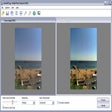
It focuses on one creative task: generating realistic water and mirror reflections for still images. The app applies inverted copies of an image with configurable wave effects, size and placement controls, and transparency settings so a single photo can read as if it sits above a liquid surface. The tool acts as a lightweight creative step between capture and final presentation, useful for single-image outputs and social posts.
What image formats and platform compatibility does it support?
Format handling targets practical workflows: the app opens and saves common raster and layered formats so users can incorporate reflections into broader projects. Supported types include:
- BMP, JPG, GIF
- PNG with alpha channel
- TIF, TGA
- PSD with alpha channel control
The app runs on a wide span of Windows releases, from legacy editions through modern desktop versions, which aids use on older or varied hardware.
Is the interface approachable for newcomers?
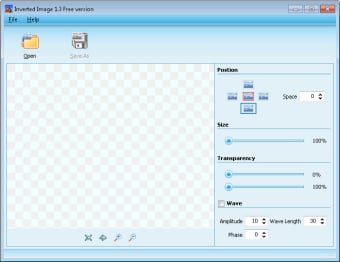
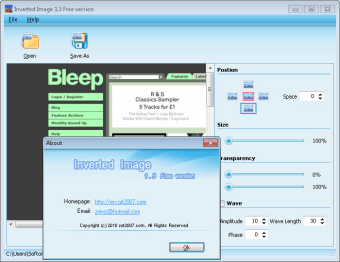
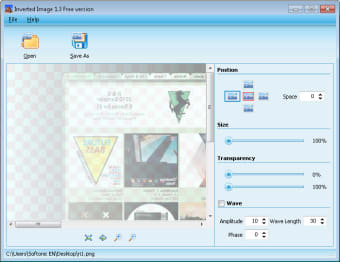
Designed for low-friction edits: the side-panel layout exposes sliders and position controls for real-time parameter changes, letting users reach finished reflections in a few clicks. That arrangement suits casual photographers and hobbyist designers who want immediate visual feedback. Although the workflow removes barriers to entry, it does not aim to replace multi-track or layer-based composition tools used in advanced image production.
How does it perform and handle multiple images?
Efficiency and batch work are core strengths: the app has a very small installer footprint and is described as low on system demands, which helps when applying effects to many files. Batch processing lets users apply the same reflection settings across folders, and alpha-channel support preserves transparent regions for later compositing. User feedback notes the program executes its primary task reliably and with minimal learning effort.
A focused, practical tool for fast reflection work
Inverted Image is a practical option for creators who need quick, convincing reflection effects without grappling with a full editor. Although the app excels at single-purpose output and batch application, it lacks advanced compositing features such as layered project management and complex masking workflows, which limits its usefulness in multi-stage production. For one-off images and social content, it offers a purposeful, low-friction creative step.